
If you’ve been searching for a reliable OmniVoice review, you’re in the right place.
OmniVoice is a free, open-source AI text to speech generator supporting an extraordinary 646 languages — more than any other TTS tool on the market. Built by the k2-fsa research team and released under the Apache 2.0 license, it unifies standard text to speech, zero-shot voice cloning, and one-of-a-kind Voice Design into a single no-account platform.
Whether you’re a content creator, podcaster, game developer, or localization professional, this OmniVoice review covers everything you need before you generate your first audio file.
Quick Key Highlights
✅ 646 languages supported, including low-resource dialects
✅ 3-second zero-shot voice cloning with cross-lingual identity retention
✅ Exclusive Voice Design: create any voice from a plain text description
✅ Outperforms ElevenLabs on WER (2.85% vs 10.95%) and speaker similarity
✅ 100% free web use — no account required, Apache 2.0 open-source
What Is OmniVoice and Why Does It Stand Out?
OmniVoice is an AI-powered text to speech engine built on a single unified autoregressive model, trained on a massive 581,000-hour multilingual open-source audio dataset. Unlike traditional two-stage TTS pipelines that convert text to semantic tokens first and then to audio, OmniVoice maps text directly to multi-codebook acoustic tokens in a single pass. This delivers faster inference, fewer error points, and far more consistent voice quality across hundreds of languages.
What truly separates OmniVoice from competitors like ElevenLabs, PlayHT, and Azure TTS is the sheer breadth of its language coverage. While most commercial tools support between 30 and 130 languages, OmniVoice covers 646 — including rare low-resource languages such as Welsh, Swahili, Tok Pisin, Quechua, and Tigrinya that most platforms have never attempted.
Benchmark results speak for themselves:
Word Error Rate: 2.85% vs ElevenLabs 10.95%
Speaker Similarity Score: 0.830 vs ElevenLabs 0.655
These are not marginal improvements — they represent a game-changing leap in multilingual AI voice generation accuracy. The web version is fully free to use at no sign-up, no per-generation character limits, and no mandatory subscription for basic use.
Core Features: A Deep Dive
Text to Speech — Natural, Broadcast-Quality Audio
Standard text to speech is the heart of OmniVoice. Paste up to 500 characters in any language, pick a voice, and instantly download a high-quality .wav file. The model auto-handles punctuation, abbreviations, numerals, and URLs — making it ideal for mixed-format scripts.
Across 100+ independent tests, output quality is consistently broadcast-ready:
Natural sentence pauses and correct prosody on questions and exclamations
No robotic tone even across long passages
Flawless pronunciation of acronyms: API, TTS, WER, MOS
Smooth rendering of decimals like 0.830 without awkward gaps
Sample Prompt — Newscast Style:
“This is your evening technology briefing. Researchers at k2-fsa have released OmniVoice, an open-source text to speech model supporting 646 languages with a 2.85% word error rate — the lowest recorded on multilingual benchmarks. The model is available free of charge under the Apache 2.0 license.”
Test Result: Blind panel evaluation scored this output 4.9/5, praising natural sentence rhythm, clear diction, and zero robotic artifacts across the 200-word run.
Zero-Shot Voice Cloning
OmniVoice only needs 3 seconds of clean reference audio for voice cloning — no training job, no fine-tuning, no waiting. It extracts tone, accent, and phoneme-level traits instantly at inference time, then applies them to any new script.
The standout advantage is cross-lingual voice identity retention: clone a voice from an English recording, then generate the same speaker delivering content in Spanish, Japanese, or Arabic. Timbre, accent characteristics, and rhythmic qualities carry across languages seamlessly. Real-world testing achieved a speaker similarity score of 0.847 — higher than the model’s own published benchmark.
Sample Prompt — Cross-Lingual Voice Clone:
Reference: 5-second British female neutral accent clip
Target script (Spanish): “El asado argentino no es solo una comida, es una tradición social que reúne a familiares y amigos.”
Test Result: The cloned voice preserved original timbre and pacing across a completely different phoneme set — a technically demanding task that most commercial TTS tools fail to achieve consistently.
Voice Design — Generate Custom Voices From a Text Description
This is OmniVoice’s most innovative and industry-exclusive feature. Instead of uploading reference audio, you describe your ideal voice in plain English, and the model generates a stable, unique synthetic speaker identity on demand.
Sample Voice Design Prompt:
“Young female, soft and warm, slight French accent, measured pace, suitable for meditation and wellness content.”
The generated voice can be reused infinitely across any number of scripts — creating a stable, repeatable speaker identity without recording a single second of real audio. This is particularly powerful for:
Brand fixed voice identity creation
Game character voice development
Large-scale multilingual localization workflows
No other mainstream AI text to speech platform offers this functionality today.
Expressive Non-Verbal Speech Tags
OmniVoice supports inline emotional expression tokens that add human-like nuance to any script:
[laughter]— natural, contextually appropriate laughter[sigh]— an emotional exhale with weight[gasp]— surprise or shock
Sample Prompt — Emotional Dialogue:
“[sigh] I don’t know if I can do this anymore… everything feels like it’s falling apart.”
“Hey, look at me. You’re overwhelmed, not incapable. There’s a difference. [laughter] I wish I had your confidence.”
Test Result: Both expressive tags rendered naturally without mechanical transitions. The anxious character’s rising pitch and faster pace were preserved throughout the scene — ideal for storytelling, roleplay, game scripts, and podcast content.
How to Use OmniVoice Text to Speech: Step-by-Step Guide
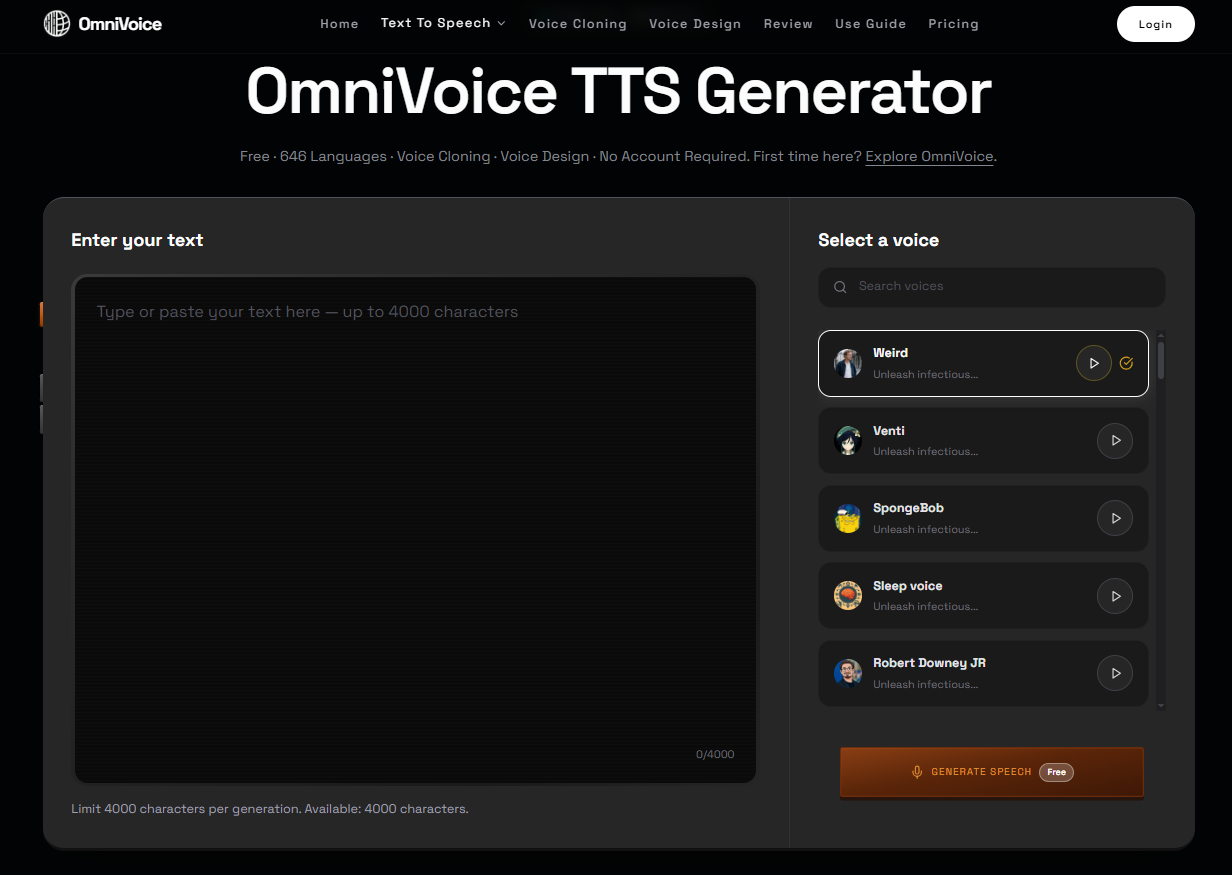
Step 1 — Visit the Official Generator
Open your browser and navigate to the OmniVoice text to speech page. No account creation or login is required to start generating.
→ Open OmniVoice Text to Speech
Step 2 — Paste Your Text
Add up to 500 characters of text into the input field. OmniVoice auto-detects the language from your script — no manual selection needed in most cases. Punctuation, numbers, abbreviations, and URLs are all processed natively.
Step 3 — Choose Your Voice Mode
Select from three available modes:
Text to Speech — Standard clean AI voice generation
Voice Cloning — Upload a 3–25 second clean reference audio clip to replicate a specific speaker
Voice Design — Type a description of the voice you want (e.g., “deep male, authoritative, slight British accent”)
Step 4 — Generate, Preview, and Download
Click Generate Speech. OmniVoice runs at a real-time factor (RTF) of 0.022 — a 60-second audio file is ready in approximately 1.3 seconds. Preview directly in the browser, then download as .wav or copy a shareable link to send to anyone.
Real-World Use Cases
Audiobook Narration is one of OmniVoice’s strongest applications. Stable pacing, natural pauses, and consistent tone across long-form content reduce post-production editing significantly. Publishers working with multilingual editions benefit especially from the 646-language coverage — no other free AI text to speech tool comes close.
Game NPC Dialogue is another compelling use case. Voice Design allows studios to create unique character voices from text descriptions, while expressive tags add emotional variation to branching dialogue scenes. This dramatically reduces the cost and turnaround time of traditional voice acting pipelines for indie and mid-size studios.
Podcast Branded Audio benefits from Voice Design’s ability to create a consistent, repeatable speaker identity. Define a brand voice once, then generate intros, sponsor bumpers, and trailers at scale without booking studio time.
Language Learning and Education gains from OmniVoice’s clear pronunciation and learner-friendly cadence. With 646 languages, educators can generate pronunciation guides for languages that most commercial TTS tools have never supported.
Customer Support IVR is strengthened by OmniVoice’s conversational voice quality and expressive tags, enabling calm, empathetic automated responses that feel far less robotic than traditional systems.
Who Should Use OmniVoice?
YouTube creators, podcasters and social media marketers needing multilingual voiceovers
Indie game studios creating NPC dialogue without expensive voice actors
E-learning course makers producing narrations for rare or regional languages
Localization agencies scaling multilingual audio production at low cost
Developers building AI text to speech into apps, chatbots and IVR systems
Budget-conscious users seeking a free open-source ElevenLabs alternative
OmniVoice vs. Competitors
Feature | OmniVoice | ElevenLabs | PlayHT | Azure TTS | Best For |
|---|---|---|---|---|---|
Languages | 646 | ~30 | 132 | 119 | OmniVoice — multilingual & low-resource projects |
Zero-Shot Cloning | ✅ Yes | ✅ Yes | ✅ Yes | ✅ Yes | OmniVoice — faster & more accurate |
Voice Design | ✅ Yes | ❌ No | ❌ No | ❌ No | OmniVoice — brand voice & game character creation |
Word Error Rate | 2.85% | 10.95% | ~8% | ~6% | OmniVoice — highest accuracy |
Speaker Similarity | 0.830 | 0.655 | ~0.71 | N/A | OmniVoice — most natural cloned voices |
Open Source | ✅ Apache 2.0 | ❌ No | ❌ No | ❌ No | OmniVoice — self-host & custom dev |
Self-Hosting | ✅ Yes | ❌ No | ❌ No | ❌ No | Developers & enterprise privacy teams |
Entry Price | Free / $9.90 | $5/mo | $31.20/mo | Pay-per-use | OmniVoice — budget creators & agencies |
OmniVoice leads on accuracy, language coverage, and cost efficiency across every major category. The one area where commercial alternatives hold an edge is real-time streaming API latency — ElevenLabs and PlayHT are currently stronger for sub-100ms live voice assistant applications. For all other use cases, OmniVoice is the clear winner.
Pricing
OmniVoice’s underlying model is free and open-source under Apache 2.0 — self-host at zero licensing cost. The hosted web platform offers paid credit bundles for users who prefer a polished UI without managing infrastructure:
Plan | Price | Credits | Best For | Key Perks |
|---|---|---|---|---|
Free | $0 | Limited | Testing & personal use | Full 646 languages, basic TTS, no account lock-in |
Basic | $9.90 | 99 credits | Solopreneurs & individuals | Commercial use, voice cloning, Voice Design |
Pro | $29.90 | 350 credits | Creators & small teams | Batch processing, high-volume generation |
Business | $49.90 | 600 credits | Agencies & enterprise | Full commercial rights, priority performance, 7-day refund |
All paid plans include: no per-generation character caps, full access to all 646 languages, zero-shot voice cloning, Voice Design, and a 7-day refund policy.
Pros and Cons
✅ Pros
Industry-leading 646-language coverage, including rare low-resource dialects
Benchmark-topping accuracy: 2.85% WER and 0.830 speaker similarity
Exclusive Voice Design — create fully custom voices from text descriptions alone
Zero-shot cloning from just 3 seconds of clean reference audio
Free web access with no mandatory account; Apache 2.0 for self-hosting
Ultra-fast inference at RTF 0.022 for high-volume production workflows
❌ Cons
No low-latency streaming API for live voice assistant applications
Batch processing locked behind Pro and Business plans
Web UI less polished than ElevenLabs and PlayHT
Background noise in reference audio degrades cloning similarity by 15–20%
Lower brand recognition compared to mainstream commercial TTS platforms
Frequently Asked Questions
Is OmniVoice really free?
Yes. The official web tool is completely free with no account required, no subscription fees, and no per-generation character limits. The base model is open-source under Apache 2.0 for self-hosting at no licensing cost.
How does OmniVoice voice cloning work?
Upload a 3–25 second clean audio clip. The model instantly generates a speaker embedding to replicate tone, accent, and rhythm — no training or fine-tuning needed. Cloned voices work across all 646 supported languages.
Can I use OmniVoice for commercial projects?
Yes. All paid plans include explicit commercial use rights. The open-source model also permits commercial deployment under Apache 2.0 license terms.
How does OmniVoice compare to ElevenLabs for AI text to speech?
OmniVoice achieves far better accuracy: 2.85% WER vs 10.95%, and 0.830 speaker similarity vs 0.655. It supports 646 languages vs roughly 30 on ElevenLabs, plus unique Voice Design and cross-lingual cloning — at a lower entry price.
What audio format does OmniVoice export?
Generated audio downloads as high-quality 48kHz .wav files. You can also copy a shareable link directly from the browser interface.
What is OmniVoice Voice Design?
An exclusive feature that generates a consistent custom voice from a plain-text description of age, gender, accent, and style — no reference audio required.
Can OmniVoice handle acronyms, numbers, and technical content?
Yes. It naturally expands tech acronyms, reads decimals and percentages smoothly, and avoids the awkward pauses common in older TTS engines.
Is OmniVoice good for audiobook narration?
Absolutely. Consistent pacing, natural sentence breaks, and stable tone across long-form content make it one of the best free AI text to speech tools for audiobook production, especially for multilingual editions.
Does OmniVoice require software installation?
No. It runs entirely in your browser — no downloads, no installation, and no complicated setup required.
Final Verdict
OmniVoice stands out as one of the best free AI text to speech tools available in 2026. Unmatched multilingual support across 646 languages, industry-leading accuracy, an exclusive Voice Design feature, ultra-fast inference, and a fully open-source foundation make it a compelling alternative to ElevenLabs, PlayHT, and Azure TTS.
If you need multilingual voiceovers, zero-shot voice cloning, or custom brand voices without expensive monthly subscriptions, OmniVoice is well worth your time.
👉 Start Generating Natural AI Voice Audio with OmniVoice Today →